Chart analysis tools
Support and resistance levels, with evidence you can inspect.
Support and resistance levels mark areas where price has repeatedly turned. ChartPro helps you find those areas from real market data and check the touches behind them, without drawing every line by hand.
Explore support and resistance
What are support and resistance levels?
Support describes an area below the latest price where previous declines turned upward. Resistance describes an area above it where previous advances turned downward. These are observations about the chart history. A later move can pass through either area.
Think in zones rather than exact prices. Repeated turns can be close together without matching to the cent. The timeframe matters too: daily bars and hourly bars can produce different levels because they summarize different price movements.
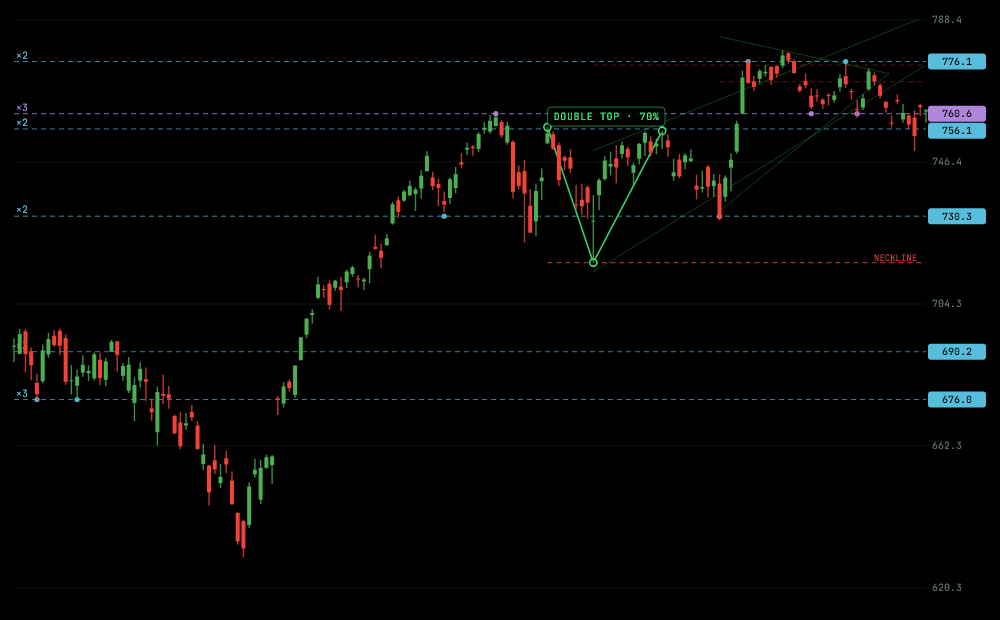
Example: read the evidence behind a line
In the SPY example, start with one horizontal line and trace it back to the turns near it. A label showing two touches means two qualifying turns were grouped into that level. It does not mean the next encounter has a known chance of holding.
Now compare a neighboring level. Ask whether its touches are more recent, whether it lies above or below the latest close, and whether the chart has crossed it. A touch count is useful context, rather than a ranking of which price must matter next.
How to find support and resistance levels
- Open the app and search for an Indian or US stock, ETF or index.
- Check the instrument, exchange and chart timeframe.
- Inspect the computed levels and touch counts; select a level to highlight it on the chart.
- Compare its historical turns with the latest close. Keep the observation attached to that timeframe.
ChartPro groups nearby swing highs and lows from fetched price bars. At least two qualifying touches are required. The expanded list shows up to four detected support levels and four resistance levels, nearest first. If the data does not contain enough qualifying groups, fewer appear.
Can a level change sides?
Yes. An area that acted as support can later act as resistance after price moves below it, and the reverse can happen. ChartPro marks levels tested from both sides in purple. The support and resistance guide explains these flip levels with an Apple chart example.
What if you want the process automated?
The automatic support resistance tool page explains the detection steps and why results differ between tools. For a manual walkthrough, read how to find support and resistance. Levels describe historical structure; they do not establish future outcomes.