Chart analysis tools
Automatic support resistance, computed from real price bars.
An automatic support resistance tool finds repeated price zones using a consistent set of rules. ChartPro detects swing points, groups nearby turns and shows touch counts so you can inspect how each level was formed.
What does automatic detection actually do?
A useful detector replaces repeated drawing with a repeatable calculation. In ChartPro, the input is fetched open, high, low and close price bars. The level engine runs on your device; its prices come from those bars.
- Find swings. Identify local highs and lows relative to neighboring bars.
- Group nearby turns. Treat closely spaced swing prices as a shared zone.
- Count qualifying touches. Keep groups with at least two touches and consider recency when scoring them.
- Place the levels. Separate detected groups above and below the latest close and show the nearest ones first.
This is a historical swing-clustering method. It differs from conventional pivot-point formulas calculated from a previous period's high, low and close. Two tools using different definitions can return different prices from the same market.
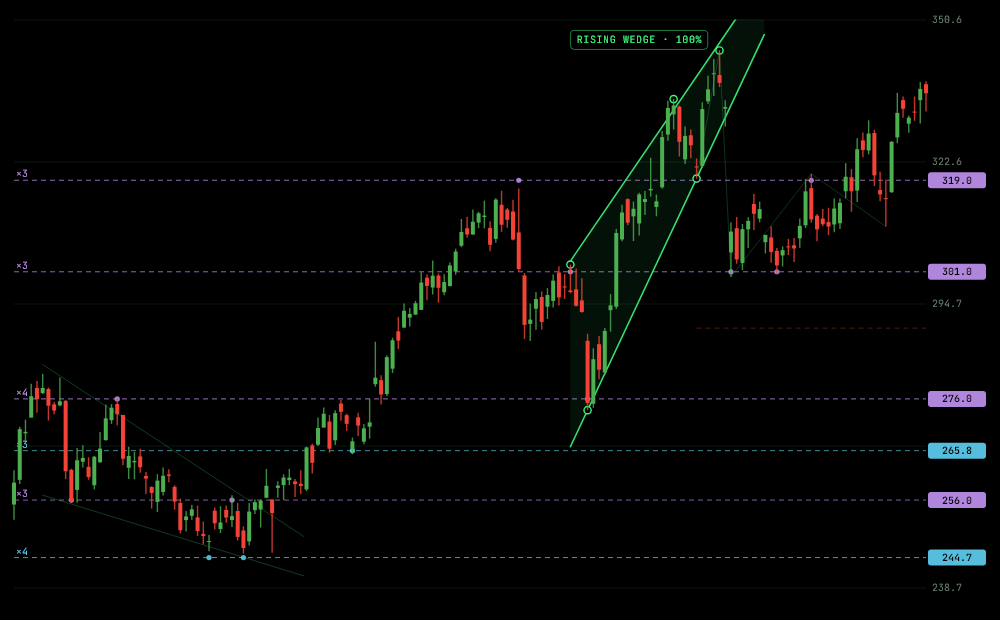
Example: check a level that changed sides
Look at a purple level in the Apple chart. Trace the historical bars near that line and note where price approached from above and from below. The overlay summarizes those turns in one place, saving the work of marking them separately.
Automation makes that grouping consistent. It still requires interpretation: a touch count describes past interactions, while the feed, interval and available history determine what the calculation can see.
Why might two automatic tools disagree?
- Swing rules: a wider neighborhood filters out smaller turns.
- Zone tolerance: a broader band merges prices another tool separates.
- History and timeframe: different bars contain different swings.
- Method: pivot formulas and historical clusters measure different things.
Match the instrument and interval before comparing results. Read what ChartPro's R1–R4 and S1–S4 labels mean to understand the ordering.
Try it on a market you recognize
Open ChartPro, search by company or market name, confirm the listing, and inspect a computed level. Start with its touch count and highlight it on the chart. Both Monthly and Annual include unlimited chart analysis; the app shows the available plans.
Does the tool always show four levels per side?
No. Four is the display limit on each side in the expanded list, not a quota. Sparse history or a chart near the edge of its observed range can leave fewer qualifying levels. For the underlying concepts, see support and resistance levels.